Every Plugin Gets a Score
Each active plugin gets a clear health label based on measured load-time impact and frontend asset weight.
Every plugin on your WordPress site adds weight. Most site owners have no idea which ones are dragging page speed down. PHM scans your active plugins, shows their impact, and helps you decide what to check first. Install it, run a scan, and review results in minutes.
WordPress.org listing status: pending review. The public listing link and direct download button will be added once approved.
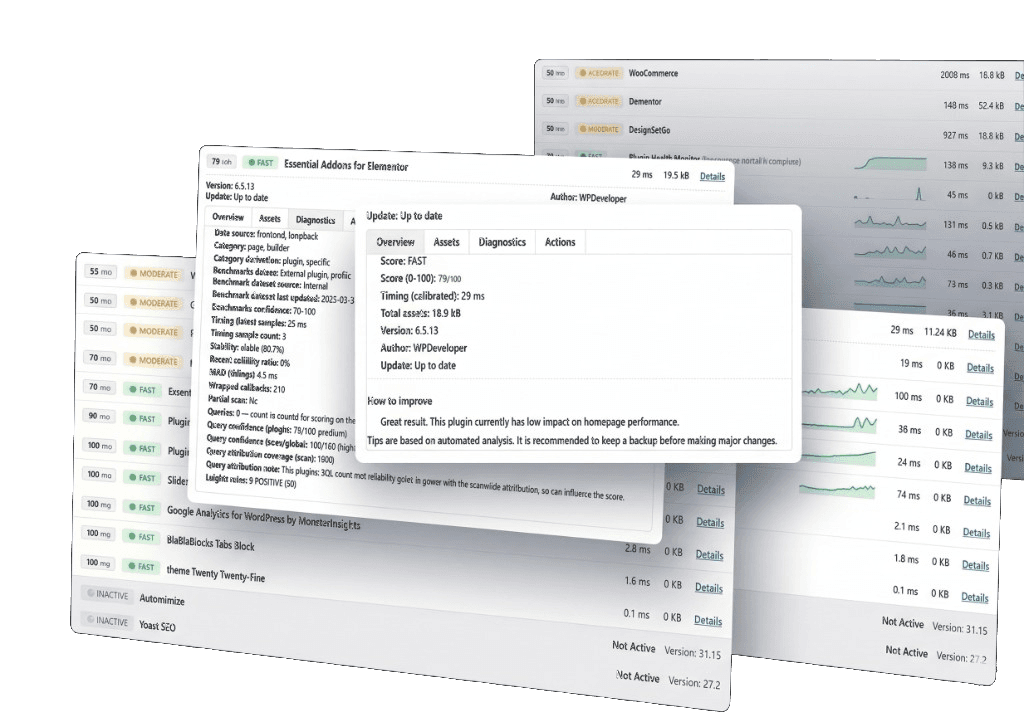
Each active plugin gets a clear health label based on measured load-time impact and frontend asset weight.
Scan results include per-plugin metrics, so you can quickly spot heavy plugins and re-scan after changes to confirm improvement.
PHM points you to practical next steps, so you can prioritize fixes and validate them with the next scan.
PHM was built by someone who works with real production incidents.
After 10+ years building monitoring and protection systems for organizations that can't afford downtime, I built PHM to solve a problem I kept seeing: WordPress sites slowing down because nobody measured plugin performance.
PHM focuses on practical diagnostics inside WordPress admin: run a scan, review plugin impact, and decide what to optimize first.
PHM is designed to give you practical data you can act on, directly inside WordPress admin.
- Maor Akoka, Creator of PHM
Get immediate visibility into which plugins hurt speed and decide what to optimize first.
Use plugin-level findings to explain performance decisions clearly to clients and teams.
Re-scan after updates and keep a stable, measurable optimization workflow.
Yes. PHM is available as a free WordPress plugin. Pro unlocks higher scan limits, advanced diagnostics, and priority support.
No. PHM runs inside your WordPress admin so you can scan and review plugin impact without switching tools.
Current release metadata: tested up to WordPress 6.8 and requires PHP 7.4.
Visit the Changelog for public PHM version notes.